> ## Documentation Index
> Fetch the complete documentation index at: https://docs.adopt.ai/llms.txt
> Use this file to discover all available pages before exploring further.
# Agents & Human-in-the-Loop
> Compose skills into a workflow with the logic between them, and place the human review gates that keep you in control.
Building a skill is one thing; stringing several together into a workflow that actually completes a close or files a return is another. That's what Agents do. An Agent composes multiple [Skills](/accounting/skills) and the glue logic between them — sequencing, routing, branching, and model reasoning — to accomplish a larger goal. It's where behaviour is defined, and it's where a human gets pulled into the loop.
## What Are Agents?
Agents are the primary build surface and the unit of deployment — the [End-User App](/accounting/end-user-app) runs agents, not raw skills or connectors. The skills an agent composes bring their own connector access and primitive associations; the agent orchestrates them into one execution context, holding state across every step of a run.
An Agent is an orchestrated workflow with built-in checkpoints — it coordinates capabilities, data, decisions, and human sign-off toward a defined outcome. Agents can even call other agents.
An agent reaches the [Adopt Primitives](/accounting/data-store) only *indirectly* — through the skills it composes, which carry the pipeline, Data Store, File Explorer, and workstream associations. The agent never wires to a primitive on its own.
## How to Access Agents
Click **Agents** in the left navigation, under the **Build** group. This opens the agent library.
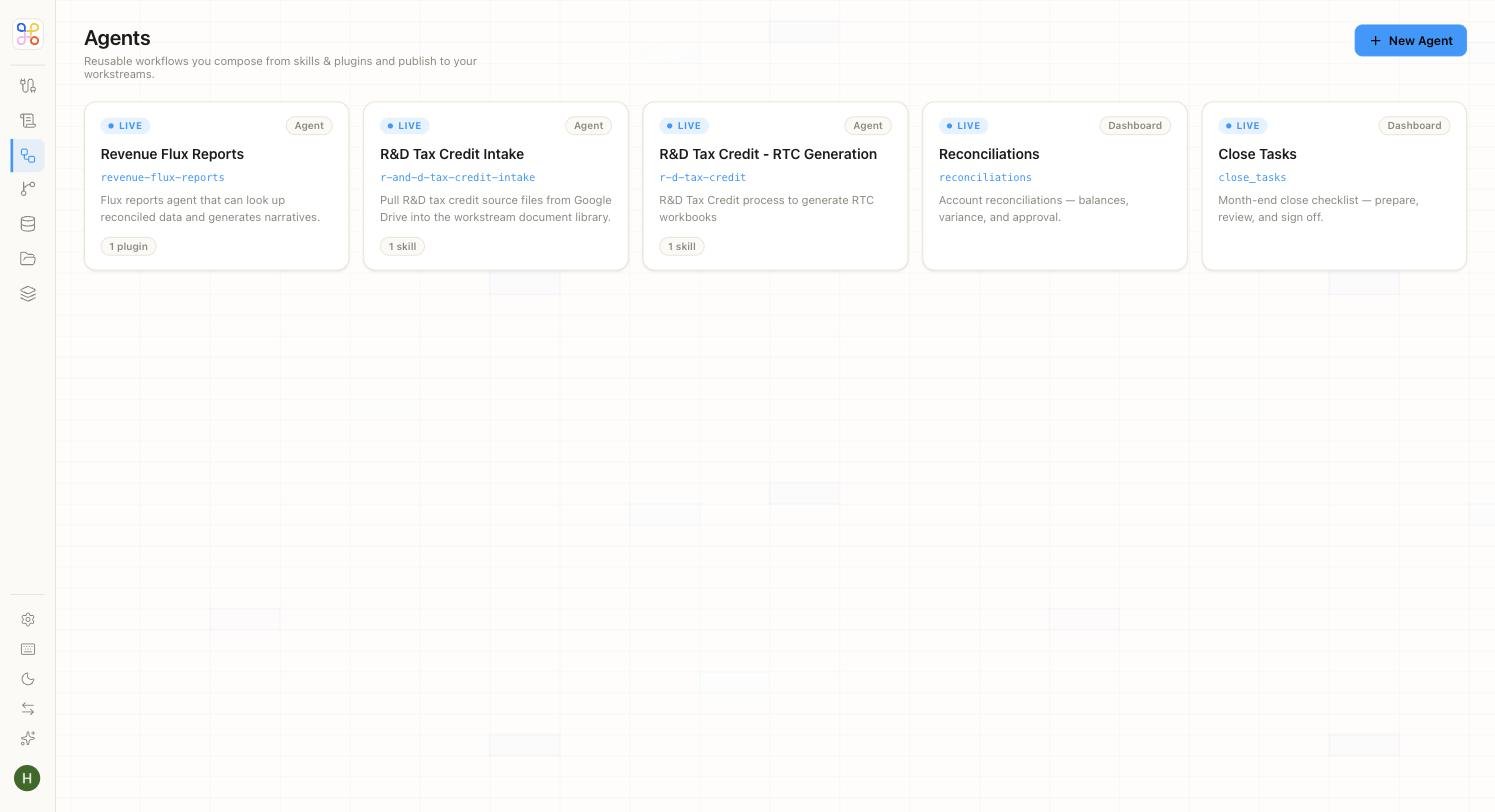 Each card shows the agent's status (**LIVE** when published), a type badge, its name and slug, a short description, and how many skills or plugins it uses. The library above includes real accounting agents — Revenue Flux Reports, R\&D Tax Credit Intake and Generation, Reconciliations, and Close Tasks.
### Agent and Dashboard Types
Agents come in two flavours, shown by the badge on each card:
| Type | What it is |
| ------------- | ---------------------------------------------------------------------------------------------------------------------------------------------- |
| **Agent** | A conversational workflow. The user talks to it, and it runs skills, reasons, and pauses for review as needed. |
| **Dashboard** | A structured UI surface backed by an agent — for example, the Reconciliations or Close Tasks views that read directly from a Data Store table. |
## What an Agent Is Composed Of
You build an agent through a five-step wizard. Each step captures one part of the agent's definition.
Give the agent its name and identity.
Pick the skills and plugins this agent may use. Your selections appear as chips — this is where the agent's abilities are assembled.
Describe how the agent should behave and sequence its work. This is the glue logic that ties the skills together.
Choose which workstreams this agent runs for. Agents bind to their workstreams at build time.
Confirm the configuration and create the agent.
## Human-in-the-Loop Gates
Human review isn't an afterthought bolted onto an agent — it's a first-class part of how an agent is built. Within its logic, an agent can open a **gate** that pauses execution and asks a person to review, confirm, or override before it continues.
An agent halts at the gate, a human acts, and the agent resumes with that input injected back into its context. Gates can be conditional — you might open one only when confidence is low, only on flagged exceptions, or always.
A human-in-the-loop gate stops the agent until a person responds. Place gates at the moments that genuinely need a professional's sign-off — posting journal entries, publishing a report, filing a return — not on routine steps, or you'll create unnecessary waiting.
At runtime, a gate surfaces in the End-User App as an **"Action needed"** step: the reviewer sees the agent's work laid out and makes the call. For the reviewer's side of this, see [The End-User App](/accounting/end-user-app).
## Why Agents Matter
Agents are where isolated skills become real work. A reconciliation skill on its own reconciles; an agent turns that into a month-end close — running the reconcile, drafting the entries, gating the exceptions for a controller, and publishing the package once it's approved. And because human review lives inside the agent, the professional's judgment is built into the workflow rather than tacked on at the end.
## Next Steps
1. [Run an agent in the End-User App](/accounting/end-user-app)
2. [Set up the Workstreams an agent runs for](/accounting/workstreams)
3. [Follow the full build → run sequence](/accounting/build-to-run)
Each card shows the agent's status (**LIVE** when published), a type badge, its name and slug, a short description, and how many skills or plugins it uses. The library above includes real accounting agents — Revenue Flux Reports, R\&D Tax Credit Intake and Generation, Reconciliations, and Close Tasks.
### Agent and Dashboard Types
Agents come in two flavours, shown by the badge on each card:
| Type | What it is |
| ------------- | ---------------------------------------------------------------------------------------------------------------------------------------------- |
| **Agent** | A conversational workflow. The user talks to it, and it runs skills, reasons, and pauses for review as needed. |
| **Dashboard** | A structured UI surface backed by an agent — for example, the Reconciliations or Close Tasks views that read directly from a Data Store table. |
## What an Agent Is Composed Of
You build an agent through a five-step wizard. Each step captures one part of the agent's definition.
Give the agent its name and identity.
Pick the skills and plugins this agent may use. Your selections appear as chips — this is where the agent's abilities are assembled.
Describe how the agent should behave and sequence its work. This is the glue logic that ties the skills together.
Choose which workstreams this agent runs for. Agents bind to their workstreams at build time.
Confirm the configuration and create the agent.
## Human-in-the-Loop Gates
Human review isn't an afterthought bolted onto an agent — it's a first-class part of how an agent is built. Within its logic, an agent can open a **gate** that pauses execution and asks a person to review, confirm, or override before it continues.
An agent halts at the gate, a human acts, and the agent resumes with that input injected back into its context. Gates can be conditional — you might open one only when confidence is low, only on flagged exceptions, or always.
A human-in-the-loop gate stops the agent until a person responds. Place gates at the moments that genuinely need a professional's sign-off — posting journal entries, publishing a report, filing a return — not on routine steps, or you'll create unnecessary waiting.
At runtime, a gate surfaces in the End-User App as an **"Action needed"** step: the reviewer sees the agent's work laid out and makes the call. For the reviewer's side of this, see [The End-User App](/accounting/end-user-app).
## Why Agents Matter
Agents are where isolated skills become real work. A reconciliation skill on its own reconciles; an agent turns that into a month-end close — running the reconcile, drafting the entries, gating the exceptions for a controller, and publishing the package once it's approved. And because human review lives inside the agent, the professional's judgment is built into the workflow rather than tacked on at the end.
## Next Steps
1. [Run an agent in the End-User App](/accounting/end-user-app)
2. [Set up the Workstreams an agent runs for](/accounting/workstreams)
3. [Follow the full build → run sequence](/accounting/build-to-run)