> ## Documentation Index
> Fetch the complete documentation index at: https://docs.adopt.ai/llms.txt
> Use this file to discover all available pages before exploring further.
# Data Store
> Structured, queryable tables that hold pipeline and agent output — and pass work from one agent to the next.
Once a [Pipeline](/accounting/pipelines) has pulled and cleaned your data, it has to go somewhere agents can actually use it. That somewhere is the Data Store — the platform's structured, queryable storage. It's a set of tables with schemas, rows, and SQL access that pipelines write to and agents read from and write back to.
## What Is the Data Store?
The Data Store is the shared data substrate for the whole platform. Where [File Explorer](/accounting/file-explorer) holds raw documents, the Data Store holds structured rows — general ledger entries, reconciliations, client records, tax returns. It's stateful: the data persists between runs, so an agent can pick up exactly where the last one left off.
The Data Store is the platform's operational database and message-passing bus rolled into one — structured tables for reporting, plus a place to drop work for the next agent.
## How to Access the Data Store
Click **Data Store** in the left navigation, under the **Adopt Primitives** group. This opens the tables view.
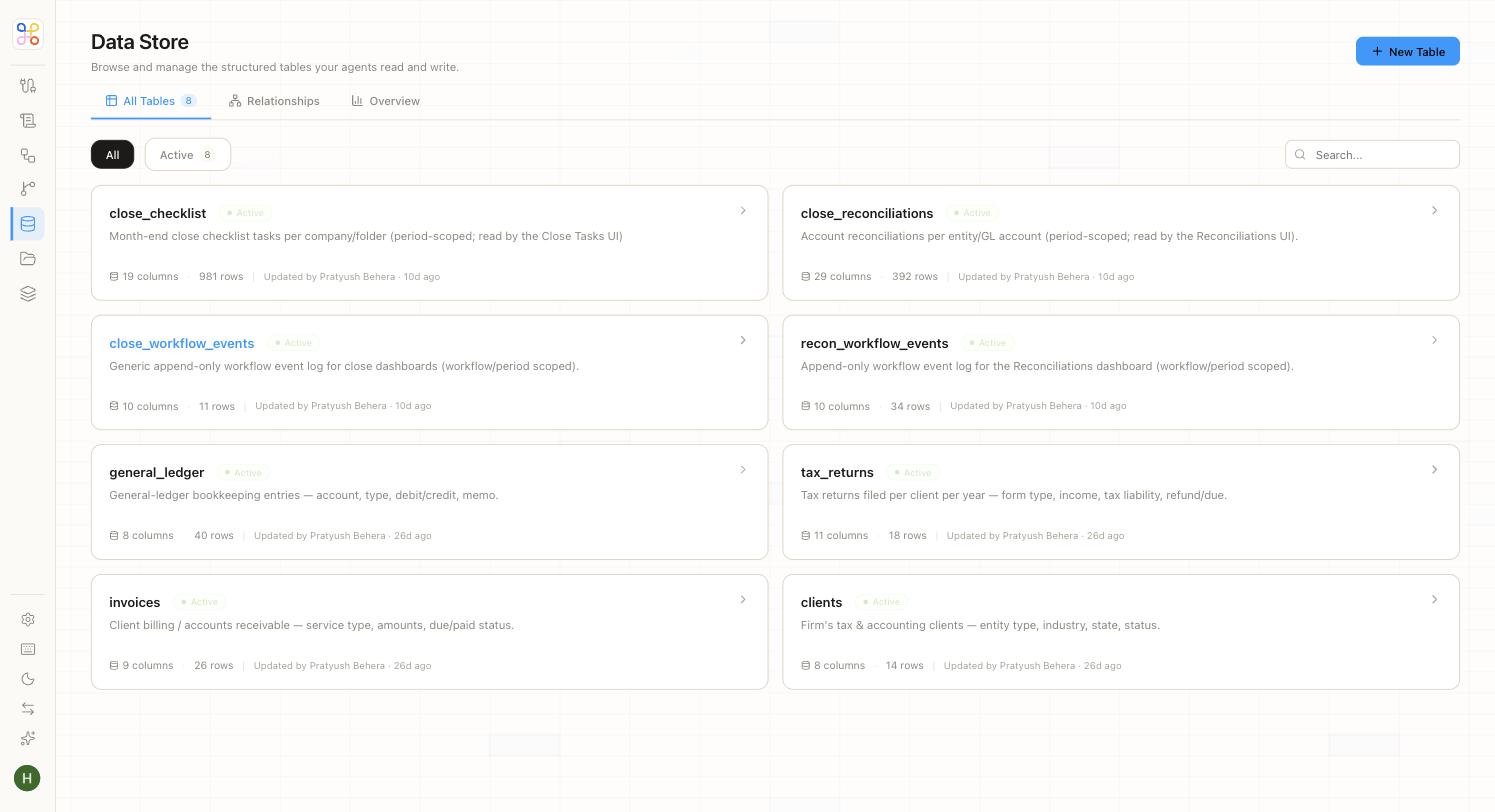 Three tabs sit at the top: **All Tables** (the list), **Relationships** (how tables link to each other), and **Overview**.
## Inside the Tables List
Each table appears as a card showing its name, status, a plain-language description, and its size. The tables are the working data of an accounting practice — for example:
| Table | What it holds |
| -------------------------- | ------------------------------------------------------------------------------------- |
| **general\_ledger** | General-ledger bookkeeping entries — account, type, debit/credit, memo. |
| **invoices** | Client billing / accounts receivable — service type, amounts, due/paid status. |
| **clients** | The firm's tax & accounting clients — entity type, industry, state, status. |
| **tax\_returns** | Tax returns filed per client per year — form type, income, tax liability, refund/due. |
| **close\_checklist** | Month-end close checklist tasks per company and period. |
| **close\_reconciliations** | Account reconciliations per entity and GL account. |
Notice that some descriptions note the table is "read by the Close Tasks UI" or "read by the Reconciliations UI" — that's a Data Store table feeding a Dashboard agent's surface directly.
## Exploring a Table
Click any table to open its detail view. A row of tabs gives you everything about that table.
Three tabs sit at the top: **All Tables** (the list), **Relationships** (how tables link to each other), and **Overview**.
## Inside the Tables List
Each table appears as a card showing its name, status, a plain-language description, and its size. The tables are the working data of an accounting practice — for example:
| Table | What it holds |
| -------------------------- | ------------------------------------------------------------------------------------- |
| **general\_ledger** | General-ledger bookkeeping entries — account, type, debit/credit, memo. |
| **invoices** | Client billing / accounts receivable — service type, amounts, due/paid status. |
| **clients** | The firm's tax & accounting clients — entity type, industry, state, status. |
| **tax\_returns** | Tax returns filed per client per year — form type, income, tax liability, refund/due. |
| **close\_checklist** | Month-end close checklist tasks per company and period. |
| **close\_reconciliations** | Account reconciliations per entity and GL account. |
Notice that some descriptions note the table is "read by the Close Tasks UI" or "read by the Reconciliations UI" — that's a Data Store table feeding a Dashboard agent's surface directly.
## Exploring a Table
Click any table to open its detail view. A row of tabs gives you everything about that table.
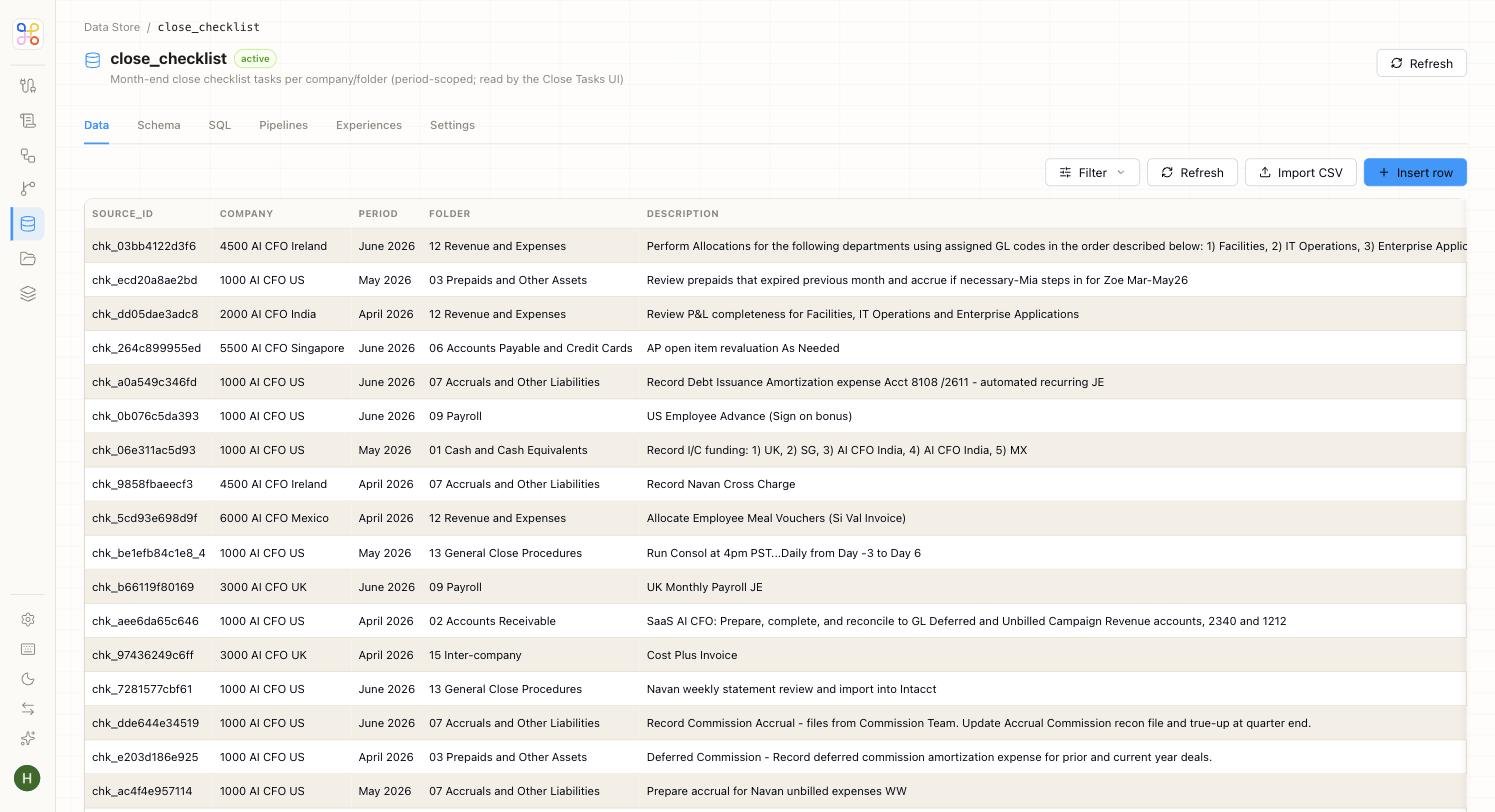 | Tab | What it shows |
| --------------- | ---------------------------------------------------------------------------------- |
| **Data** | The rows themselves, with tools to filter, refresh, import a CSV, or insert a row. |
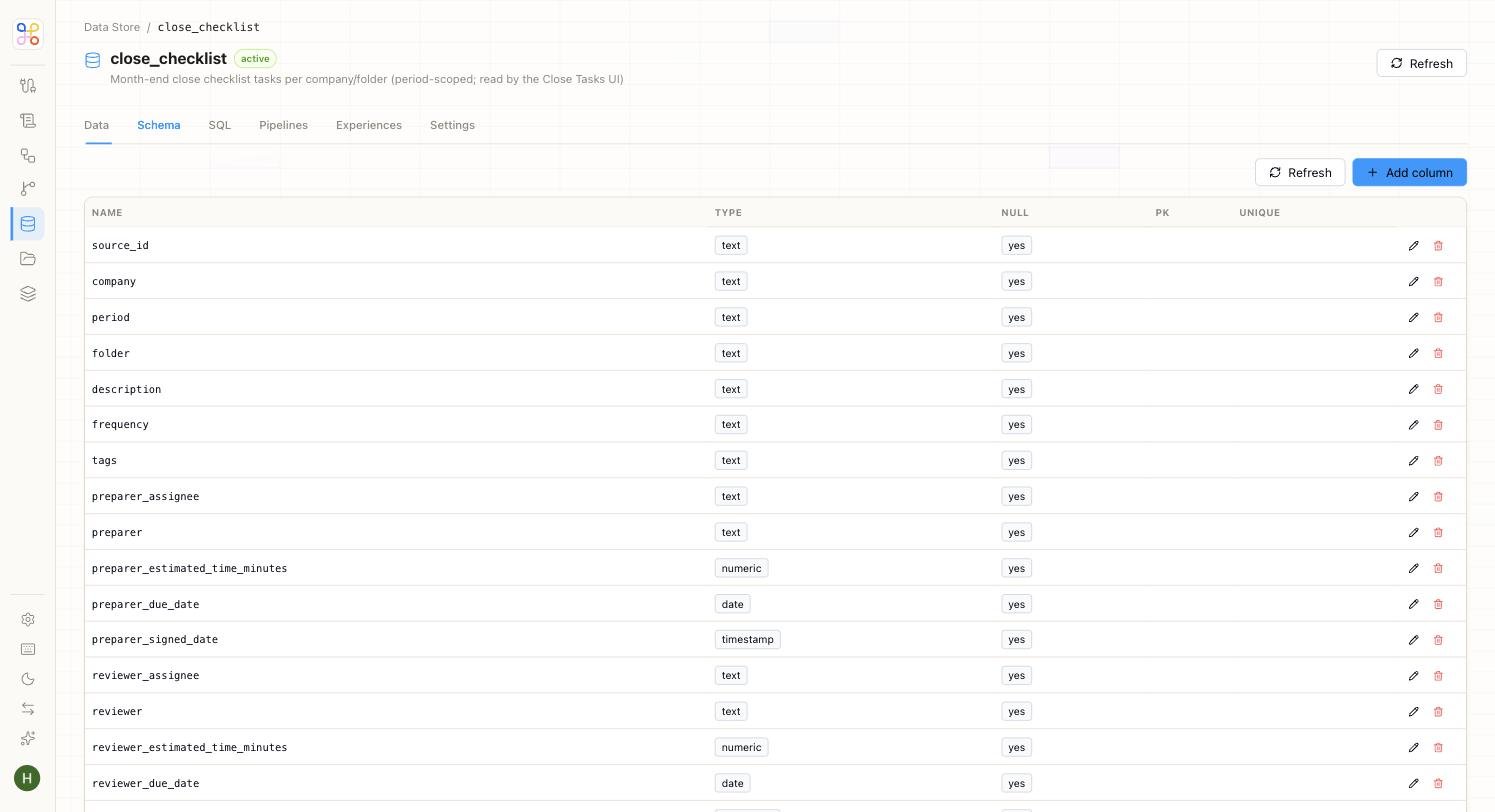
| **Schema** | The table's columns, their types, and their constraints. |
| **SQL** | A SQL editor for querying the table directly. |
| **Pipelines** | The pipelines that write to this table. |
| **Experiences** | The surfaces that read this table. |
| **Settings** | Table-level configuration. |
The **Schema** tab is where you see a table's structure — every column with its type and whether it's nullable, a primary key, or unique.
| Tab | What it shows |
| --------------- | ---------------------------------------------------------------------------------- |
| **Data** | The rows themselves, with tools to filter, refresh, import a CSV, or insert a row. |
| **Schema** | The table's columns, their types, and their constraints. |
| **SQL** | A SQL editor for querying the table directly. |
| **Pipelines** | The pipelines that write to this table. |
| **Experiences** | The surfaces that read this table. |
| **Settings** | Table-level configuration. |
The **Schema** tab is where you see a table's structure — every column with its type and whether it's nullable, a primary key, or unique.
 ## What the Data Store Is For
The Data Store does four distinct jobs, and it helps to keep them straight:
* **Landing pipeline output** — the structured result of every pipeline run.
* **Capturing agent output** — results an agent produces, persisted for later steps or reporting.
* **Agent-to-agent handoff** — an intermediate store where one agent parks data for another to pick up and continue.
* **Feeding UIs** — tables can be read directly by an agent's end-user surface, like the Close Tasks or Reconciliations dashboards.
Everything in the Data Store is scoped by the [Workstream](/accounting/workstreams) it belongs to — the schema is shared across clients, but the rows are isolated.
## Why the Data Store Matters
The Data Store is what lets a multi-step workflow actually work. A close involves several agents — intake, reconcile, adjust, review, publish — and each one needs to hand structured results to the next. Rather than passing data through brittle exports or messages, each agent writes clean rows to a shared table the next agent reads. It's also inspectable end to end, so you can always see exactly what data a run was working from.
## Next Steps
1. [See how File Explorer handles raw documents](/accounting/file-explorer)
2. [Understand how Workstreams isolate table data](/accounting/workstreams)
3. [Trace the runtime data flow](/accounting/how-it-connects)
## What the Data Store Is For
The Data Store does four distinct jobs, and it helps to keep them straight:
* **Landing pipeline output** — the structured result of every pipeline run.
* **Capturing agent output** — results an agent produces, persisted for later steps or reporting.
* **Agent-to-agent handoff** — an intermediate store where one agent parks data for another to pick up and continue.
* **Feeding UIs** — tables can be read directly by an agent's end-user surface, like the Close Tasks or Reconciliations dashboards.
Everything in the Data Store is scoped by the [Workstream](/accounting/workstreams) it belongs to — the schema is shared across clients, but the rows are isolated.
## Why the Data Store Matters
The Data Store is what lets a multi-step workflow actually work. A close involves several agents — intake, reconcile, adjust, review, publish — and each one needs to hand structured results to the next. Rather than passing data through brittle exports or messages, each agent writes clean rows to a shared table the next agent reads. It's also inspectable end to end, so you can always see exactly what data a run was working from.
## Next Steps
1. [See how File Explorer handles raw documents](/accounting/file-explorer)
2. [Understand how Workstreams isolate table data](/accounting/workstreams)
3. [Trace the runtime data flow](/accounting/how-it-connects)