> ## Documentation Index
> Fetch the complete documentation index at: https://docs.adopt.ai/llms.txt
> Use this file to discover all available pages before exploring further.
# Introduction
> What Adopt AI for Accounting & Tax is, how it's structured, and how the pieces fit together.
If you run an accounting or tax practice, you already have the systems — the ledgers, the tax software, the document drives, the practice tools. What you don't have is a way to put agents to work *across* all of them without ripping anything out. That's what this platform does.
Adopt AI turns the manual, repetitive parts of accounting and tax work — reconciliations, the month-end close, variance commentary, document intake, workpaper prep — into agent-run workflows that a professional reviews and approves before anything reaches a client. The agent prepares; you sign off.
## What Adopt AI Does for Accounting & Tax
Adopt AI is an orchestration layer that sits on top of the tools your firm already uses. It reads data from those systems, runs agents over it, and writes results back — without replacing your ledger, your tax engine, or your document store.
Every workflow ends with a human. An agent might reconcile fifty accounts, draft the journal entries, and flag three exceptions — but it pauses and hands those exceptions to a controller before the books are touched. This is the core idea: agents do the work, professionals keep control.
Adopt AI reads from and writes to your existing systems — it does not become your system of record. Your ledger and tax software remain the source of truth.
## The Two Views: Builder and App
The same platform is surfaced through two lenses, and it helps to hold both in mind from the start.
The **Builder** is where the platform is assembled — where you register systems, compose skills, wire up agents, and set up the data infrastructure behind them. It's the workshop.
The **End-User App** is where people run the agents day to day. A team member opens an agent, scopes it to a client, has a conversation, and steps in whenever the agent asks for a decision. It's the storefront.
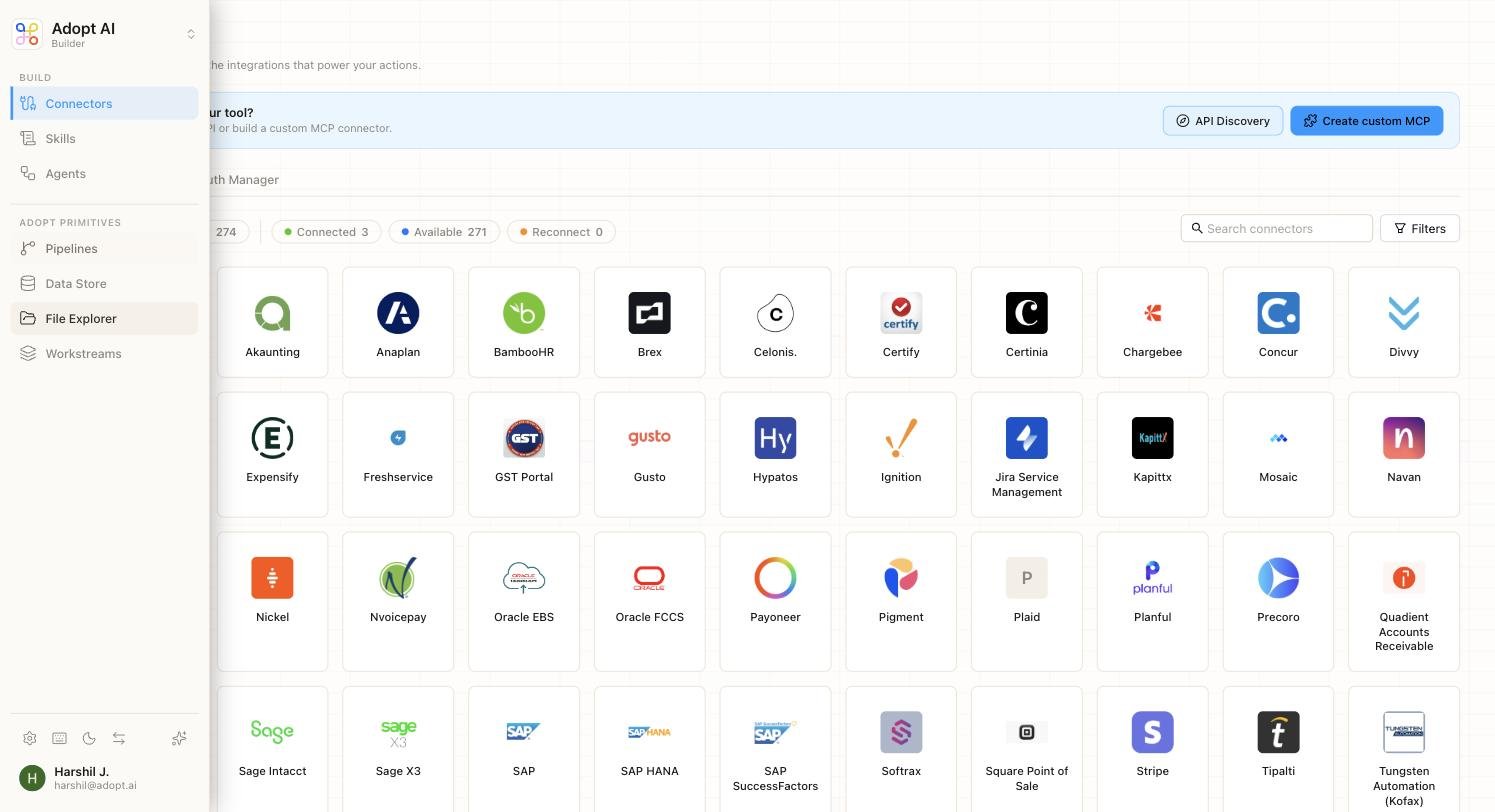 Neither view re-implements the other. Builders assemble; end-users run and review. Both work over the same underlying objects.
## The Building Blocks
The platform is made of six core concepts. Three of them are the *capability* track — what an agent can do. The other four are the *primitives* — the data and infrastructure agents draw on.
| Concept | What it is |
| ----------------- | -------------------------------------------------------------------------------------------------------------------------- |
| **Connectors** | Authenticated access to an external system — your ledger, drive, tax portal, or any API. Access only, no opinion. |
| **Skills** | A single, well-defined job an agent can do, combining connectors with a natural-language instruction. Where intent enters. |
| **Agents** | Multiple skills chained together with the logic between them — and the place human review gates live. |
| **Pipelines** | Scheduled jobs that pull data in, transform it, and land it in the Data Store. |
| **Data Store** | Structured, queryable tables that agents read from and write to. |
| **File Explorer** | Raw source documents — PDFs, spreadsheets — organized per client. |
| **Workstreams** | The isolation boundary. One workstream per client, keeping every client's data sealed off from the rest. |
Each layer adds exactly one thing the layer below it lacks: Connectors add access, Skills add intent, Agents add behaviour. The primitives keep the data clean, organized, and separated by client so agents never have to hit raw systems mid-conversation.
## Who This Is For
This documentation is written for the people setting up and running Adopt AI inside an accounting or tax firm — the practitioners building agents in the Builder, and the team members running them in the App. You don't need to be an engineer. If you understand how your firm's close, tax, or advisory work actually happens, you have what you need to follow along.
## Next Steps
1. [Understand the platform architecture](/accounting/platform-architecture)
2. [Start with Connectors](/accounting/connectors) — the foundation everything else is built on
3. [See how everything connects](/accounting/how-it-connects)
Neither view re-implements the other. Builders assemble; end-users run and review. Both work over the same underlying objects.
## The Building Blocks
The platform is made of six core concepts. Three of them are the *capability* track — what an agent can do. The other four are the *primitives* — the data and infrastructure agents draw on.
| Concept | What it is |
| ----------------- | -------------------------------------------------------------------------------------------------------------------------- |
| **Connectors** | Authenticated access to an external system — your ledger, drive, tax portal, or any API. Access only, no opinion. |
| **Skills** | A single, well-defined job an agent can do, combining connectors with a natural-language instruction. Where intent enters. |
| **Agents** | Multiple skills chained together with the logic between them — and the place human review gates live. |
| **Pipelines** | Scheduled jobs that pull data in, transform it, and land it in the Data Store. |
| **Data Store** | Structured, queryable tables that agents read from and write to. |
| **File Explorer** | Raw source documents — PDFs, spreadsheets — organized per client. |
| **Workstreams** | The isolation boundary. One workstream per client, keeping every client's data sealed off from the rest. |
Each layer adds exactly one thing the layer below it lacks: Connectors add access, Skills add intent, Agents add behaviour. The primitives keep the data clean, organized, and separated by client so agents never have to hit raw systems mid-conversation.
## Who This Is For
This documentation is written for the people setting up and running Adopt AI inside an accounting or tax firm — the practitioners building agents in the Builder, and the team members running them in the App. You don't need to be an engineer. If you understand how your firm's close, tax, or advisory work actually happens, you have what you need to follow along.
## Next Steps
1. [Understand the platform architecture](/accounting/platform-architecture)
2. [Start with Connectors](/accounting/connectors) — the foundation everything else is built on
3. [See how everything connects](/accounting/how-it-connects)