> ## Documentation Index
> Fetch the complete documentation index at: https://docs.adopt.ai/llms.txt
> Use this file to discover all available pages before exploring further.
# Skills
> Reusable, single-purpose capabilities that combine connectors with an instruction to get one job done well.
If Connectors are the access, Skills are where intent enters the picture. A Skill takes one or more [Connectors](/accounting/connectors) and pairs them with a natural-language directive to produce a single, well-defined outcome — reconcile an account, draft a flux report, intake a client's documents. It answers the question: *given this access, what exactly should the agent do, and how?*
## What Are Skills?
A Skill is a reusable, self-contained unit of capability. Each one does a single job — and does it well — regardless of which agent happens to be using it. One skill can be composed into many agents, and one skill's output can feed the next.
Skills are like named functions in a codebase — a clear signature, one responsibility, callable from many places.
A Skill is also the platform's **association hub**. It's where the connection to the [Adopt Primitives](/accounting/pipelines) is declared: the pipelines a skill defines, the [Data Store](/accounting/data-store) tables and [File Explorer](/accounting/file-explorer) folders it reads and writes, and the [Workstreams](/accounting/workstreams) it runs in. Agents inherit all of these through the skills they compose — which is why the skill is where these wires get connected.
## How to Access Skills
Click **Skills** in the left navigation, under the **Build** group. This opens the skills library.
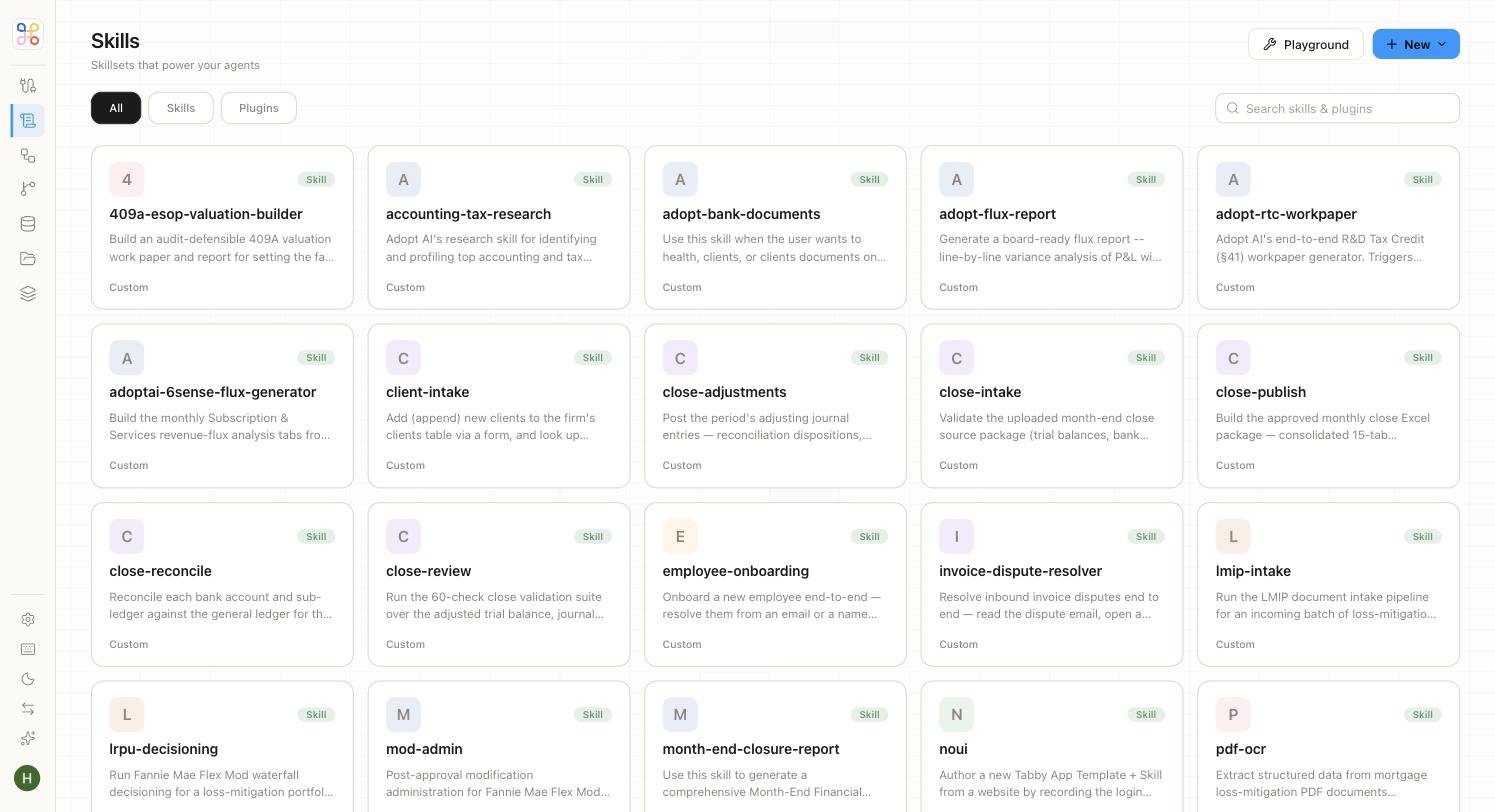 The library shows every skill available to your firm. A filter row lets you switch between **All**, **Skills**, and **Plugins**, and a search bar finds a skill by name. Each card shows the skill's name, a short description of the outcome it produces, and a type label.
The skills here are real, accounting-specific capabilities — for example:
* **adopt-flux-report** — Generate a board-ready flux report: line-by-line variance analysis of the P\&L with plain-English commentary.
* **close-reconcile** — Reconcile each bank account and sub-ledger against the general ledger for the period.
* **409a-esop-valuation-builder** — Build an audit-defensible 409A valuation workpaper and report.
* **adopt-rtc-workpaper** — Adopt's end-to-end R\&D Tax Credit (§41) workpaper generator.
* **client-intake** — Add new clients to the firm's clients table via a form, and look up existing ones.
## What a Skill Contains
Every skill is defined by a consistent set of parts. Understanding them is the key to understanding how a skill behaves.
| Part | What it is |
| --------------------------- | ---------------------------------------------------------------------------------------------------------------------------------- |
| **Name & description** | The outcome the skill represents. |
| **Instruction prompt** | The directive the model follows when the skill runs. |
| **Connectors** | The authenticated access the skill is permitted to use. |
| **Input / output contract** | What the skill expects to receive and what it returns. |
| **Primitive associations** | The pipelines it defines, the Data Store tables and File Explorer folders it reads and writes, and the workstreams it's scoped to. |
| **Bundled files** | Templates, reference material, and scripts packaged with the skill. |
## Inside a Skill
Open any skill to see its full definition. The detail view puts the skill's instruction front and centre, with its bundled files listed alongside.
The library shows every skill available to your firm. A filter row lets you switch between **All**, **Skills**, and **Plugins**, and a search bar finds a skill by name. Each card shows the skill's name, a short description of the outcome it produces, and a type label.
The skills here are real, accounting-specific capabilities — for example:
* **adopt-flux-report** — Generate a board-ready flux report: line-by-line variance analysis of the P\&L with plain-English commentary.
* **close-reconcile** — Reconcile each bank account and sub-ledger against the general ledger for the period.
* **409a-esop-valuation-builder** — Build an audit-defensible 409A valuation workpaper and report.
* **adopt-rtc-workpaper** — Adopt's end-to-end R\&D Tax Credit (§41) workpaper generator.
* **client-intake** — Add new clients to the firm's clients table via a form, and look up existing ones.
## What a Skill Contains
Every skill is defined by a consistent set of parts. Understanding them is the key to understanding how a skill behaves.
| Part | What it is |
| --------------------------- | ---------------------------------------------------------------------------------------------------------------------------------- |
| **Name & description** | The outcome the skill represents. |
| **Instruction prompt** | The directive the model follows when the skill runs. |
| **Connectors** | The authenticated access the skill is permitted to use. |
| **Input / output contract** | What the skill expects to receive and what it returns. |
| **Primitive associations** | The pipelines it defines, the Data Store tables and File Explorer folders it reads and writes, and the workstreams it's scoped to. |
| **Bundled files** | Templates, reference material, and scripts packaged with the skill. |
## Inside a Skill
Open any skill to see its full definition. The detail view puts the skill's instruction front and centre, with its bundled files listed alongside.
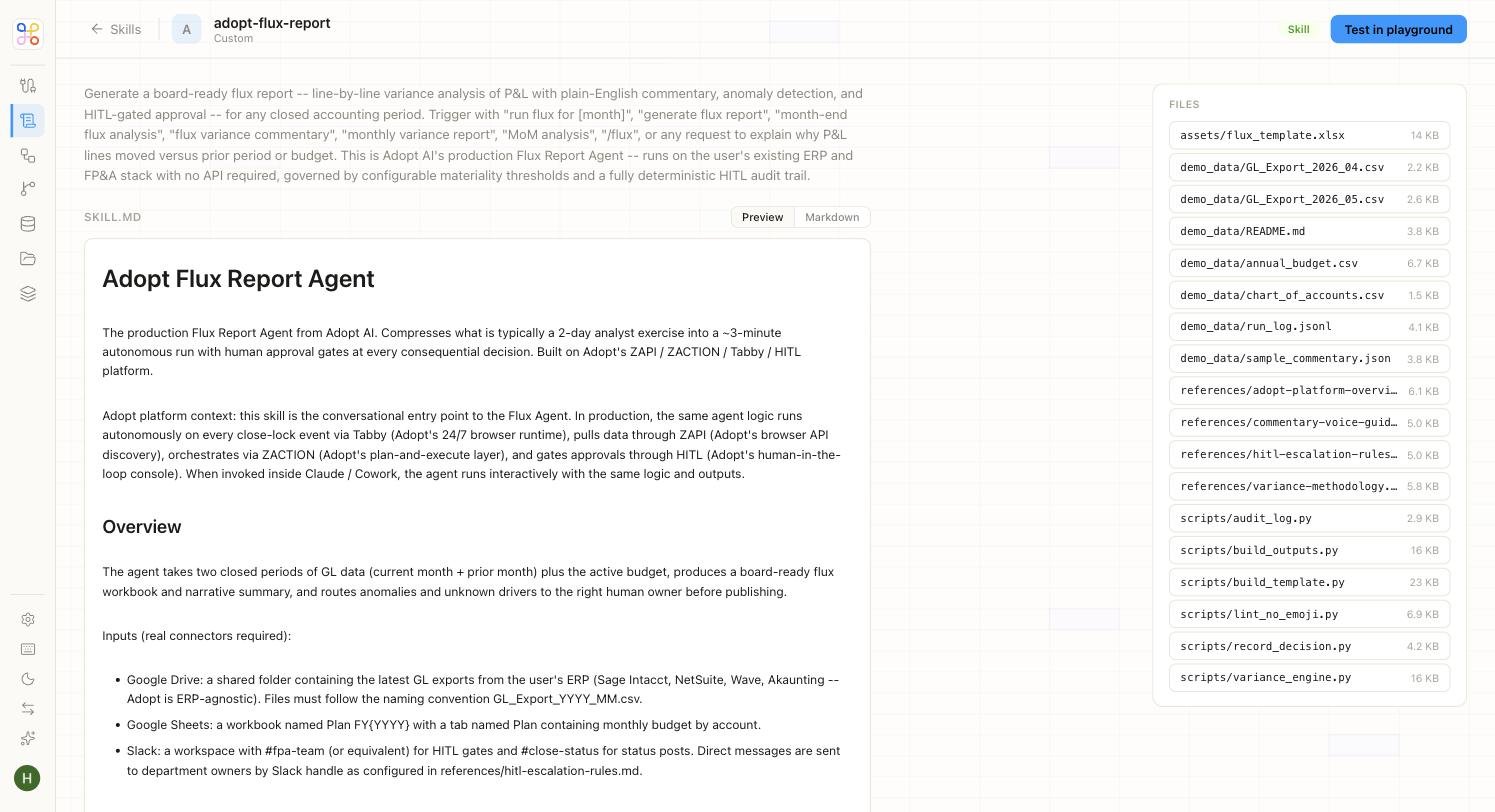 The instruction is written in Markdown — a `SKILL.MD` document you can read as a formatted **Preview** or as raw **Markdown**. It lays out exactly what the skill does, the inputs it needs, and how it should behave.
The **Files** panel on the right lists everything packaged with the skill: report templates, reference guides, sample data, and the scripts that carry out the work. This is what makes a skill portable — the instruction and everything it depends on travel together.
## Skills and Plugins
Skills and **Plugins** live side by side in the library, and both can be composed into agents. A Skill is a single capability you build and own; a Plugin bundles capabilities together for a specific tool or workflow. Use the **Plugins** filter to view them on their own.
## Testing a Skill in the Playground
You don't have to wire a skill into an agent to see whether it works. Click **Test in playground** on any skill — or the **Playground** button at the top of the library — to run the skill in isolation against real inputs.
Test a skill in the Playground before composing it into an agent. Confirming it produces the right output on its own makes debugging the full agent far easier later.
## Why Skills Matter
Skills are where reuse compounds. Because a skill is self-contained and doesn't know which agent it lives in, the `close-reconcile` skill you build once can power a month-end close agent, a mid-month spot-check agent, and an audit-prep agent — with no duplication. Build a solid library of skills and assembling agents becomes a matter of picking the right ones off the shelf.
## Next Steps
1. [Compose skills into an Agent](/accounting/agents)
2. [Attach a Pipeline to a skill that needs data](/accounting/pipelines)
3. [See how skills sit at the centre of the platform](/accounting/how-it-connects)
The instruction is written in Markdown — a `SKILL.MD` document you can read as a formatted **Preview** or as raw **Markdown**. It lays out exactly what the skill does, the inputs it needs, and how it should behave.
The **Files** panel on the right lists everything packaged with the skill: report templates, reference guides, sample data, and the scripts that carry out the work. This is what makes a skill portable — the instruction and everything it depends on travel together.
## Skills and Plugins
Skills and **Plugins** live side by side in the library, and both can be composed into agents. A Skill is a single capability you build and own; a Plugin bundles capabilities together for a specific tool or workflow. Use the **Plugins** filter to view them on their own.
## Testing a Skill in the Playground
You don't have to wire a skill into an agent to see whether it works. Click **Test in playground** on any skill — or the **Playground** button at the top of the library — to run the skill in isolation against real inputs.
Test a skill in the Playground before composing it into an agent. Confirming it produces the right output on its own makes debugging the full agent far easier later.
## Why Skills Matter
Skills are where reuse compounds. Because a skill is self-contained and doesn't know which agent it lives in, the `close-reconcile` skill you build once can power a month-end close agent, a mid-month spot-check agent, and an audit-prep agent — with no duplication. Build a solid library of skills and assembling agents becomes a matter of picking the right ones off the shelf.
## Next Steps
1. [Compose skills into an Agent](/accounting/agents)
2. [Attach a Pipeline to a skill that needs data](/accounting/pipelines)
3. [See how skills sit at the centre of the platform](/accounting/how-it-connects)