> ## Documentation Index
> Fetch the complete documentation index at: https://docs.adopt.ai/llms.txt
> Use this file to discover all available pages before exploring further.
# Agents, Spaces, and Skills
> What an agent is, the Space that gets created with it, and how skills define what it can do.
The agent is the thing that actually does the work. Two supporting objects travel with it — a Space and a set of Skills — and understanding all three together explains most of what you'll see on the builder surface.
## Agent
An **Agent** is the thing that does the work. It has:
* a name and a fixed identifier (set once, at creation)
* a description of what it prepares
* **instructions** — how it should approach the work
* **skills** — the capabilities it's allowed to use
* an enabled state controlling whether workstreams can see it
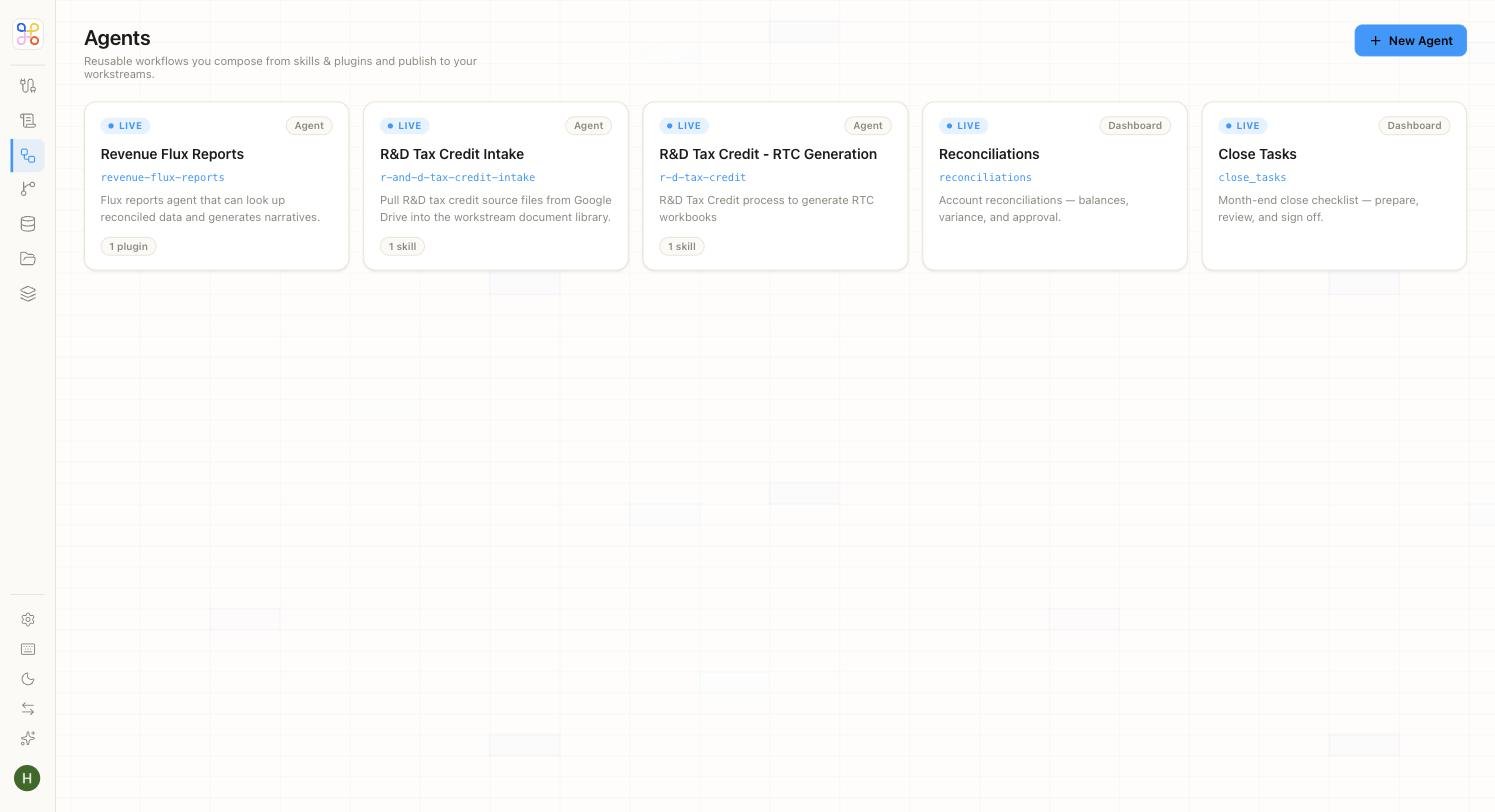 On the end-user surface you don't create an agent directly; choosing a task template creates and configures one for you.
## Space
Naming an agent silently provisions a **Space** — an isolated bucket for that agent's data. You work in terms of the agent; the Space stays behind the scenes. You rarely touch it directly, but it's why an agent's working data stays separate from everything else.
## Skills
**Skills** are the capabilities an agent can use. Each skill declares what it does. Common ones:
* **Read documents** — search and cite files in the Doc Store
* **Query Data Store** — read structured tables
* **Generate workpaper** — produce a cited workpaper
* **Web search** — look up public guidance
* **Tax Forms** — fill and validate IRS forms
Skills are tagged by origin — for example `DEFAULT` (available to everyone) or `ORG` (specific to your organization).
**Skills declare capability, not access.** Turning on "Read documents" lets the agent read documents it has *already* been given access to. It does not widen what data the agent can see — that's controlled separately by [access scoping](/security-access/access-scoping).
On the Quick setup path, skills are chosen for you by the task template. On the Advanced path, builders pick them explicitly.
## How they fit together
```text theme={null}
Agent ──has──▶ Instructions (how to work)
──uses──▶ Skills (what it can do)
──reads──▶ Doc Store files + Data Store tables (only what it's granted)
──creates──▶ Output (waits for HITL review)
──backed by──▶ Space (isolated data bucket, automatic)
```
## Next steps
1. [The object model](/core-concepts/the-object-model)
2. [Creating an agent](/builder-guide/create-an-agent)
3. [Instructions and skills](/builder-guide/instructions-and-skills)
On the end-user surface you don't create an agent directly; choosing a task template creates and configures one for you.
## Space
Naming an agent silently provisions a **Space** — an isolated bucket for that agent's data. You work in terms of the agent; the Space stays behind the scenes. You rarely touch it directly, but it's why an agent's working data stays separate from everything else.
## Skills
**Skills** are the capabilities an agent can use. Each skill declares what it does. Common ones:
* **Read documents** — search and cite files in the Doc Store
* **Query Data Store** — read structured tables
* **Generate workpaper** — produce a cited workpaper
* **Web search** — look up public guidance
* **Tax Forms** — fill and validate IRS forms
Skills are tagged by origin — for example `DEFAULT` (available to everyone) or `ORG` (specific to your organization).
**Skills declare capability, not access.** Turning on "Read documents" lets the agent read documents it has *already* been given access to. It does not widen what data the agent can see — that's controlled separately by [access scoping](/security-access/access-scoping).
On the Quick setup path, skills are chosen for you by the task template. On the Advanced path, builders pick them explicitly.
## How they fit together
```text theme={null}
Agent ──has──▶ Instructions (how to work)
──uses──▶ Skills (what it can do)
──reads──▶ Doc Store files + Data Store tables (only what it's granted)
──creates──▶ Output (waits for HITL review)
──backed by──▶ Space (isolated data bucket, automatic)
```
## Next steps
1. [The object model](/core-concepts/the-object-model)
2. [Creating an agent](/builder-guide/create-an-agent)
3. [Instructions and skills](/builder-guide/instructions-and-skills)