> ## Documentation Index
> Fetch the complete documentation index at: https://docs.adopt.ai/llms.txt
> Use this file to discover all available pages before exploring further.
# Zero Shot API Ingestion (ZAPI)
> Understand how Adopt's Agent auto-discovers and structures your app’s API's and tools for LLM readiness.
## What is ZAPI?
ZAPI is Adopt’s proprietary system for automatic API discovery—no Postman files, no Swagger docs, no manual definitions needed.
It allows our agents to explore your application like a power user would, capture all the underlying network files, and catalog every API in a way that's structured, searchable, and LLM-ready.
Whether you're just getting started or want to bring in new APIs later down the line, ZAPI gives you full control over when and how discovery happens.
## How to Access ZAPI
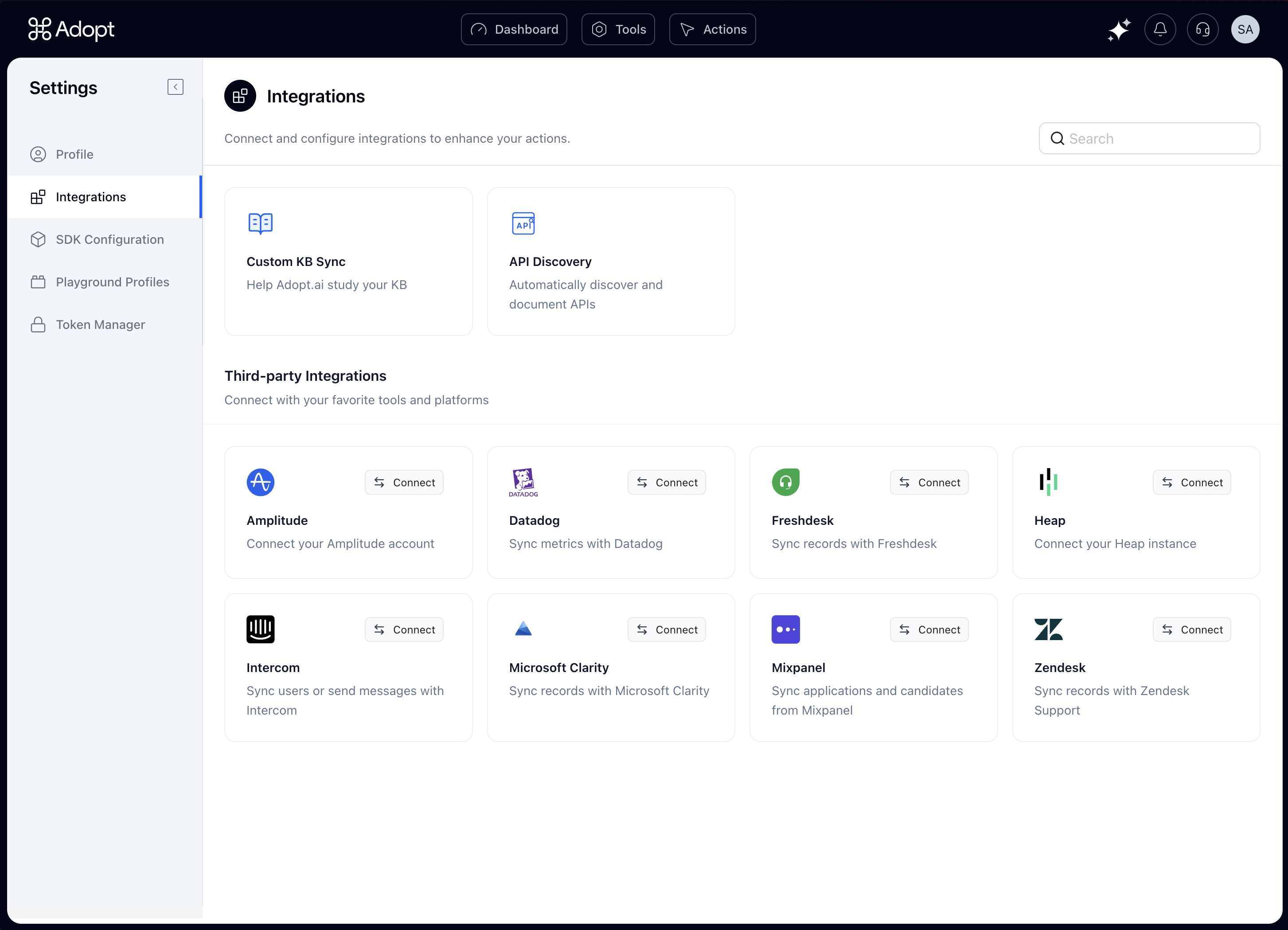 To access the ZAPI dashboard inside Adopt:
1. Click on your **profile** icon (top right).
2. Go to **Settings**.
3. In the **Integrations** tab, find the tile called `API Discovery`.
This is where you’ll see all ZAPI-related activity.
## When to Use ZAPI
ZAPI runs automatically when you first onboard with Adopt to ingest all your APIs.
But you can always return to ZAPI to trigger new discovery jobs, especially if:
* Some APIs weren’t captured during initial setup.
* Your team has shipped **new APIs** that you now want to expose to the agent.
* You want to reconfigure and **test different flows** for API capture.
## Inside the ZAPI Page
The API Discovery view gives you a clear snapshot of all jobs that have been run—past and present.
You’ll see ->
| Column | Description |
| :------------- | :------------------------------------------------------------------------------- |
| **Job ID** | Unique ID for each discovery session. |
| **Status** | Whether the job is completed, in progress, or failed. |
| **Started At** | Timestamp of when the discovery run was triggered. |
| **Duration** | How long the session took from start to finish. |
| **APIs Found** | Number of unique APIs successfully captured during the run. |
| **Actions** | Click the 👁️ view icon to see the agent's exact traversal steps during the job. |
The **Actions view** is especially powerful—it shows you exactly what the agent did in the browser: every button clicked, every form filled, and every screen visited. This makes it easy to trace how a specific API was discovered.
## Starting a New Discovery Job
If you're ready to run ZAPI again (for new APIs or updated flows), here’s how:
### Step 1: Configure the Job
Click `Configuration`, and you’ll see two tabs:
1. Discovery Tasks
2. Additional Prompt
**Discovery Tasks**
To access the ZAPI dashboard inside Adopt:
1. Click on your **profile** icon (top right).
2. Go to **Settings**.
3. In the **Integrations** tab, find the tile called `API Discovery`.
This is where you’ll see all ZAPI-related activity.
## When to Use ZAPI
ZAPI runs automatically when you first onboard with Adopt to ingest all your APIs.
But you can always return to ZAPI to trigger new discovery jobs, especially if:
* Some APIs weren’t captured during initial setup.
* Your team has shipped **new APIs** that you now want to expose to the agent.
* You want to reconfigure and **test different flows** for API capture.
## Inside the ZAPI Page
The API Discovery view gives you a clear snapshot of all jobs that have been run—past and present.
You’ll see ->
| Column | Description |
| :------------- | :------------------------------------------------------------------------------- |
| **Job ID** | Unique ID for each discovery session. |
| **Status** | Whether the job is completed, in progress, or failed. |
| **Started At** | Timestamp of when the discovery run was triggered. |
| **Duration** | How long the session took from start to finish. |
| **APIs Found** | Number of unique APIs successfully captured during the run. |
| **Actions** | Click the 👁️ view icon to see the agent's exact traversal steps during the job. |
The **Actions view** is especially powerful—it shows you exactly what the agent did in the browser: every button clicked, every form filled, and every screen visited. This makes it easy to trace how a specific API was discovered.
## Starting a New Discovery Job
If you're ready to run ZAPI again (for new APIs or updated flows), here’s how:
### Step 1: Configure the Job
Click `Configuration`, and you’ll see two tabs:
1. Discovery Tasks
2. Additional Prompt
**Discovery Tasks**
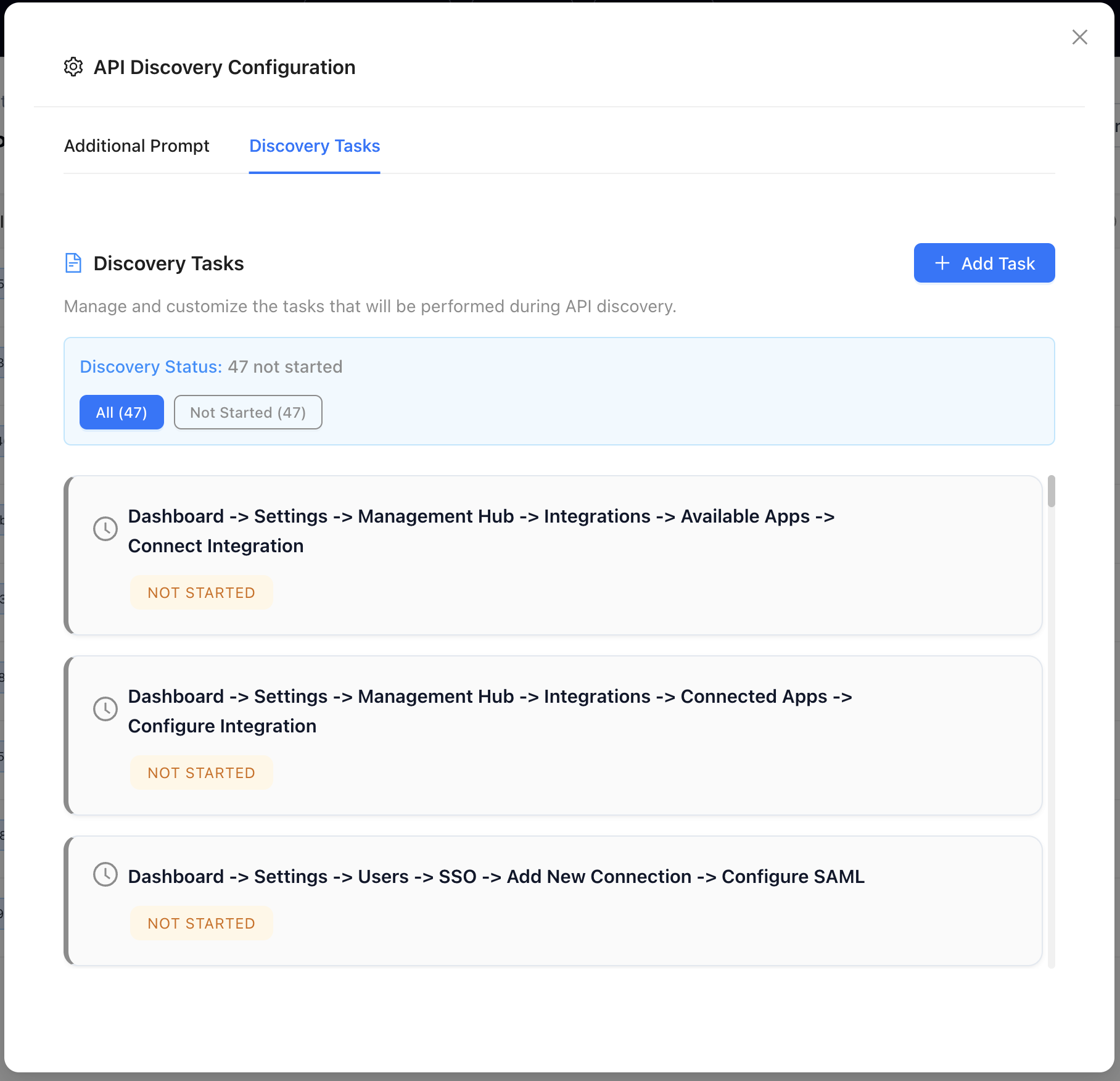 These are the actual workflows the agent will simulate in your application.
You can:
* Add or remove tasks as needed.
* Use **natural language** to describe them.
For example: *“Go to the Audit page and click on ‘Create Audit Record’ to initiate the flow.”*
ZAPI will break this down into navigable UI steps.
**Additional Prompt Instructions**
These are the actual workflows the agent will simulate in your application.
You can:
* Add or remove tasks as needed.
* Use **natural language** to describe them.
For example: *“Go to the Audit page and click on ‘Create Audit Record’ to initiate the flow.”*
ZAPI will break this down into navigable UI steps.
**Additional Prompt Instructions**
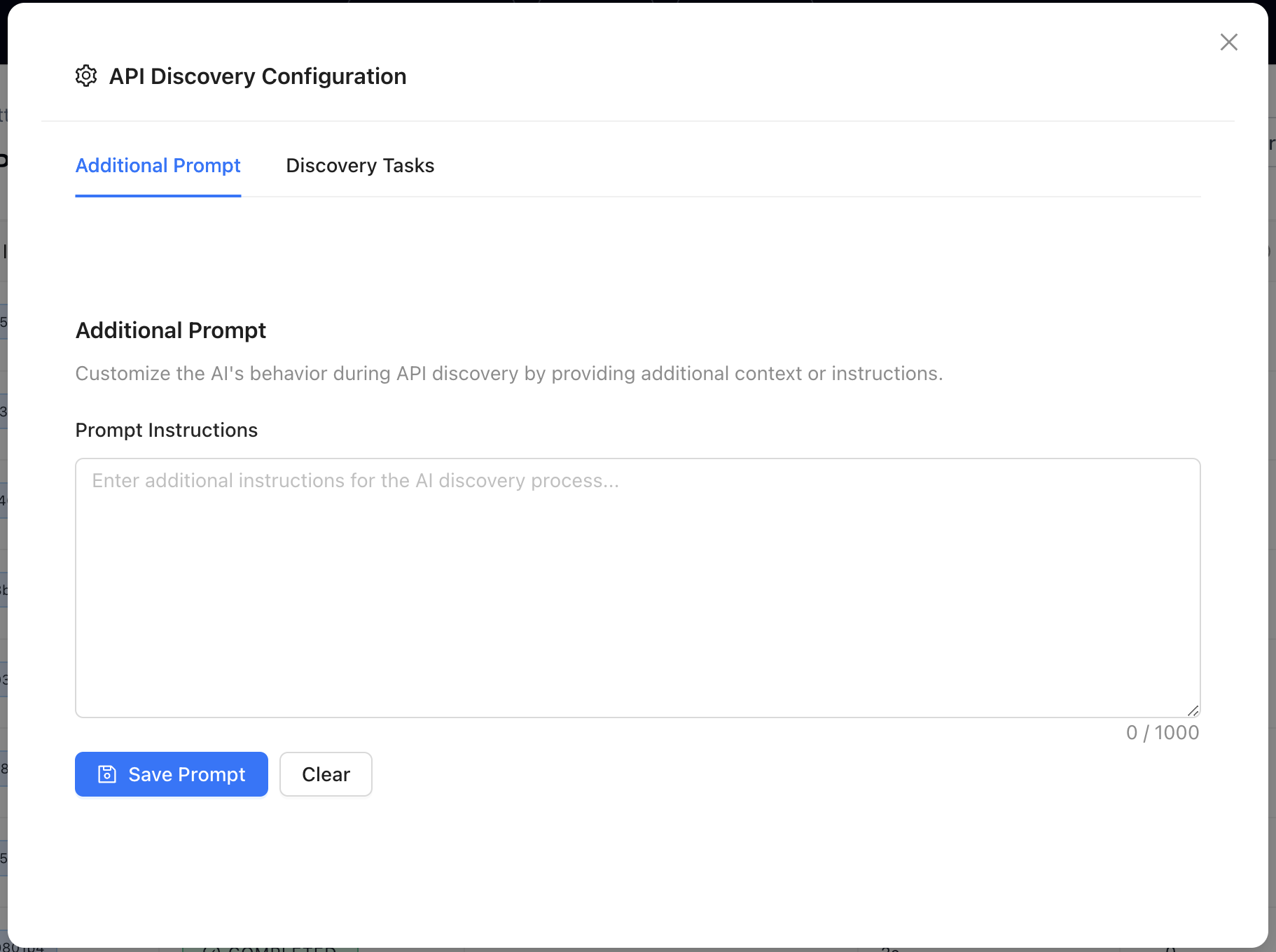 Use this space to give extra instructions to the agent. This helps fine-tune the behavior of discovery.
For example: *“When landing on the homepage, always expand the sidebar to reveal full navigation options.”*
This is especially useful for apps with dynamic menus, tabbed layouts, or progressive UIs.
### **Step 2: Start Discovery**
Once you're happy with the configuration, click `Start Discovery.`
You’ll see a dropdown with two modes:
**🤖 AI-Based Discovery**
This is fully autonomous mode.
The agent will simulate the workflows you’ve defined—clicking, navigating, triggering actions—just like a real user would. It captures every backend API triggered along the way.
**Here’s what it does →**
* Reads your KB and product documentation to understand core workflows
* Generates navigation plans based on documented features
* Automatically explores your application like a power user—clicking buttons, filling forms, moving across screens
* Captures every backend API call triggered during the process
* Produces a full set of structured, LLM-ready endpoints
**Best for →**
* Well-documented apps
* Products with standard navigation patterns
* Teams looking for automated API mapping with zero manual effort
Watch this video for a proper walkthrough →
**🧑💻 Human-Guided Discovery**
Here, the agent watches while you take the lead.
You manually perform the flows by clicking through the browser simulation, and the agent captures every API request in real time.
Use this mode when AI-based discovery hits limitations, such as :
* CAPTCHAs or MFA blocks
* Highly custom workflows
* Complex interactions not reflected in the KB
Here’s how it works →
* Launch an embedded browser inside the ZAPI interface
* Manually click through your app just like a normal user
* ZAPI captures every API call in real time as you interact
* A full API catalog is created from your exact flow
**Perfect for →**
* Apps with gated auth flows
* Domain-specific logic
* Ensuring nothing gets missed—ever
Watch this video for a proper walkthrough →
## Cancelling a Discovery Job
At any point—whether in AI or human mode—you can stop a discovery session by clicking the `Cancel` button.
And don’t worry: even if a job is interrupted mid-flow, you won’t lose progress.
## Smart Cancellation System
ZAPI uses advanced LLM intelligence and cloud-browser integration, which consumes significant compute resources. Our Smart Cancellation System ensures that every discovery run remains useful—even when cut short.
Here’s what it guarantees:
* **Zero Progress Loss**: All APIs discovered before cancellation are automatically saved
* **Partial Task Capture**: Even incomplete tasks preserve any APIs found during navigation
* **Failed Task Recovery**: APIs from failed attempts are still processed and added to your Tools
Every API ZAPI touches gets captured, structured, and stored.
## What Happens After a Job Completes
Once a ZAPI discovery job finishes running—whether AI-based or human-guided—all the APIs captured during that session are:
* Automatically added to the APIs tab inside the Tools Dashboard
* Instantly available for use when building or updating Actions
* Structured and annotated in a model-friendly format so the agent can reference them accurately during execution
## Why ZAPI Matters
ZAPI addresses a critical requirement in the agentification process: providing structured, executable knowledge of your application’s backend.
By capturing real API calls through simulated or manual user flows, ZAPI:
* Eliminates the need for pre-written API specs or documentation
* Ensures complete and accurate discovery across dynamic app states
* Generates standardized API definitions that can be directly used to build agent Actions
This process forms the foundation for how Adopt understands and interacts with your product. Once ZAPI completes its job, your APIs are available, grounded, and ready to power real user tasks through the agent.
Use this space to give extra instructions to the agent. This helps fine-tune the behavior of discovery.
For example: *“When landing on the homepage, always expand the sidebar to reveal full navigation options.”*
This is especially useful for apps with dynamic menus, tabbed layouts, or progressive UIs.
### **Step 2: Start Discovery**
Once you're happy with the configuration, click `Start Discovery.`
You’ll see a dropdown with two modes:
**🤖 AI-Based Discovery**
This is fully autonomous mode.
The agent will simulate the workflows you’ve defined—clicking, navigating, triggering actions—just like a real user would. It captures every backend API triggered along the way.
**Here’s what it does →**
* Reads your KB and product documentation to understand core workflows
* Generates navigation plans based on documented features
* Automatically explores your application like a power user—clicking buttons, filling forms, moving across screens
* Captures every backend API call triggered during the process
* Produces a full set of structured, LLM-ready endpoints
**Best for →**
* Well-documented apps
* Products with standard navigation patterns
* Teams looking for automated API mapping with zero manual effort
Watch this video for a proper walkthrough →
**🧑💻 Human-Guided Discovery**
Here, the agent watches while you take the lead.
You manually perform the flows by clicking through the browser simulation, and the agent captures every API request in real time.
Use this mode when AI-based discovery hits limitations, such as :
* CAPTCHAs or MFA blocks
* Highly custom workflows
* Complex interactions not reflected in the KB
Here’s how it works →
* Launch an embedded browser inside the ZAPI interface
* Manually click through your app just like a normal user
* ZAPI captures every API call in real time as you interact
* A full API catalog is created from your exact flow
**Perfect for →**
* Apps with gated auth flows
* Domain-specific logic
* Ensuring nothing gets missed—ever
Watch this video for a proper walkthrough →
## Cancelling a Discovery Job
At any point—whether in AI or human mode—you can stop a discovery session by clicking the `Cancel` button.
And don’t worry: even if a job is interrupted mid-flow, you won’t lose progress.
## Smart Cancellation System
ZAPI uses advanced LLM intelligence and cloud-browser integration, which consumes significant compute resources. Our Smart Cancellation System ensures that every discovery run remains useful—even when cut short.
Here’s what it guarantees:
* **Zero Progress Loss**: All APIs discovered before cancellation are automatically saved
* **Partial Task Capture**: Even incomplete tasks preserve any APIs found during navigation
* **Failed Task Recovery**: APIs from failed attempts are still processed and added to your Tools
Every API ZAPI touches gets captured, structured, and stored.
## What Happens After a Job Completes
Once a ZAPI discovery job finishes running—whether AI-based or human-guided—all the APIs captured during that session are:
* Automatically added to the APIs tab inside the Tools Dashboard
* Instantly available for use when building or updating Actions
* Structured and annotated in a model-friendly format so the agent can reference them accurately during execution
## Why ZAPI Matters
ZAPI addresses a critical requirement in the agentification process: providing structured, executable knowledge of your application’s backend.
By capturing real API calls through simulated or manual user flows, ZAPI:
* Eliminates the need for pre-written API specs or documentation
* Ensures complete and accurate discovery across dynamic app states
* Generates standardized API definitions that can be directly used to build agent Actions
This process forms the foundation for how Adopt understands and interacts with your product. Once ZAPI completes its job, your APIs are available, grounded, and ready to power real user tasks through the agent.