

Your Testing Workspace
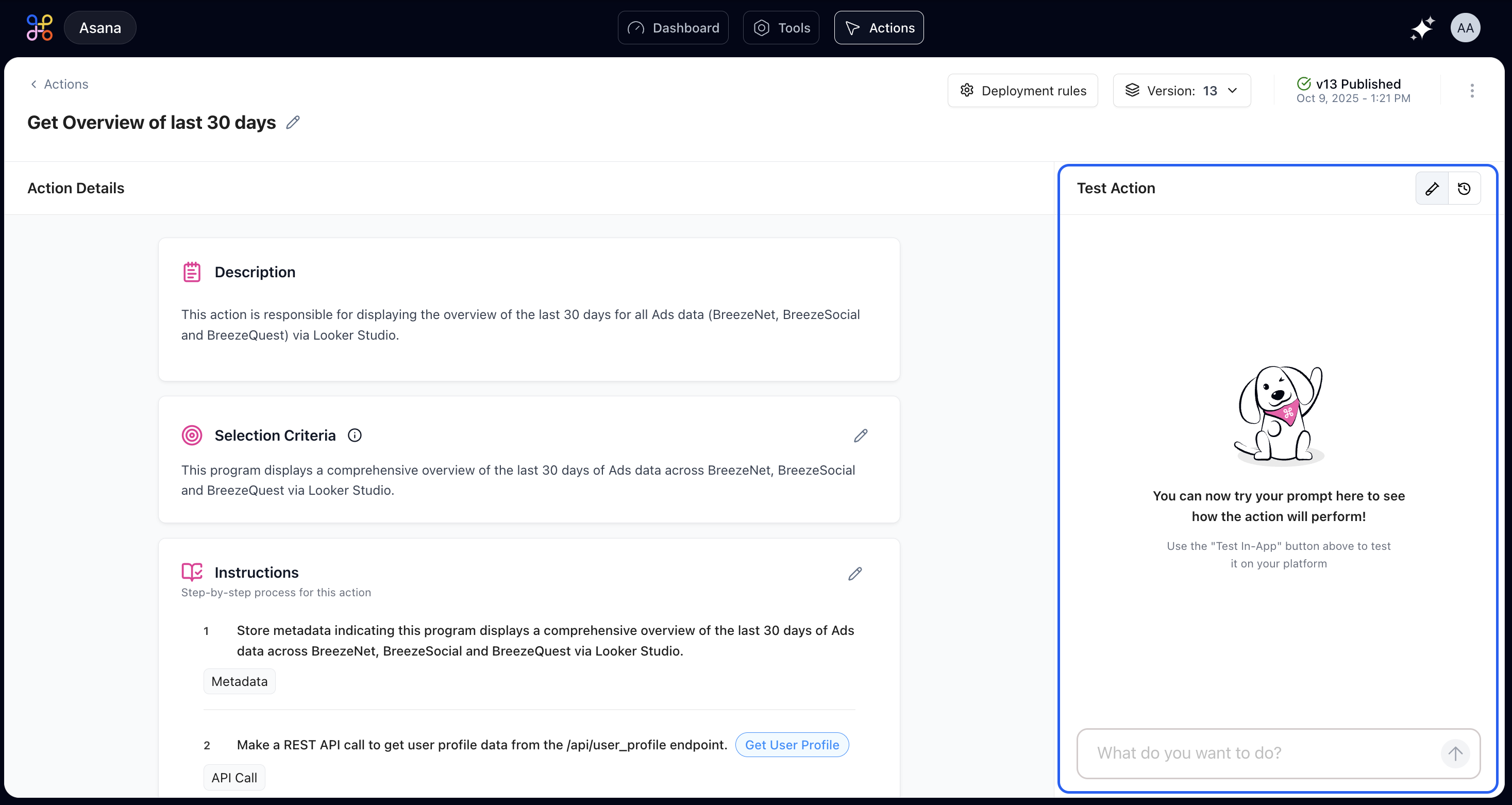
Test Panel Features
The testing workspace includes:- Input box: Enter natural language queries as users would phrase them
- Example prompts: Pre-configured test cases you can click to run
- Results display: Shows the agent’s response and any data retrieved
- Execution trace: Details which steps ran and their outputs
Running Your First Test
Start by typing a natural language query exactly as a user would phrase it. Use natural phrasing without excessive formality.Example Test Cases

Using Example Prompts
Click any of the example prompts below the input box to automatically run a test with that phrasing. This is a quick way to verify that the action handles different phrasings correctly.Verification Points
- Does the action trigger for all the example prompts?
- Are the results consistent across different phrasings?
- Does the output format appear clean and professional?
- Are all required data fields populated correctly?
Testing Edge Cases
Beyond testing expected scenarios, validate the action’s behavior with edge cases and potential failure conditions.Empty Results
Test what happens when no data matches the query:Invalid Input
Test with queries that don’t make logical sense:Missing Permissions
Test as a user who doesn’t have access to certain data:API Failures
Test how your action handles it when an external service is down. You might need to temporarily break an API endpoint for this test. Expected behavior: Graceful error handling with retry logic and clear user communication.Interpreting Test Results
Successful Execution
When the test completes successfully and produces expected output, the action is functioning correctly. Verify:- Output format matches expectations
- All required data is present
- Response time is acceptable
- User experience feels smooth
Warning Indicators
These signal potential issues that didn’t prevent execution but may cause problems in certain scenarios. Common warnings include:- Slow API response times
- Large data payloads
- Deprecated API endpoints
- Missing optional fields
Error States
Failed tests require immediate attention. Examine error details to identify the failing step and root cause. Common failure scenarios include:- API endpoint changed or is down
- Data format unexpected
- Missing required fields
- Permission issues
- Timeout errors
- Rate limiting
Issue Resolution Strategies
If the Wrong Action Triggered
Refine your selection criteria to be more specific about when this action should (and shouldn’t) run. Add more descriptive keywords and scenarios.If a Step Failed
Click on that step to edit its configuration. Common fixes:- Update API endpoint URLs
- Adjust data processing logic
- Add error handling
- Include retry mechanisms
- Update authentication credentials
If the Output is Confusing
Modify your output formatting step to present the data more clearly:- Use tables for structured data
- Add headers and labels
- Highlight important information
- Remove unnecessary fields
- Improve readability with proper spacing
If You’re Missing Data
Add a new data processing step to extract the fields you need:- Identify which API response contains the data
- Add extraction logic
- Transform format if needed
- Handle cases where data might be missing
Run the test again after each change to verify your fix worked. Iterative testing is key to building reliable actions.
Testing with Real Users
Before deploying to production, have a few team members test the action. Give them minimal guidance—you want to see if the action is intuitive to use without explanation.Questions to Ask Testers
- Could you get the results you needed?
- Was the output format helpful?
- Did anything confuse you?
- What would make this better?
- How fast did it feel?
- Would you use this regularly?
Beta Testing Process
- Select test users: Choose representatives from different roles
- Provide minimal instructions: Just tell them what the action is for
- Observe usage: Watch how they phrase requests
- Collect feedback: Ask open-ended questions
- Iterate: Make improvements based on real usage
- Repeat: Test again with refined version
Test Coverage Checklist
Before deploying to production, ensure you’ve tested:- Happy path with typical inputs
- Edge cases (empty results, invalid input)
- Different user roles and permissions
- Various phrasings of the same request
- Error scenarios (API failures, timeouts)
- Large data sets
- Concurrent usage
- Mobile and desktop interfaces
- Different time zones (if relevant)
- Boundary values (min/max dates, etc.)
Performance Testing
Beyond functional testing, consider performance:Response Time
- Actions should respond within 3-5 seconds for simple queries
- Complex analyses may take up to 15-20 seconds
- Anything longer needs optimization or progress indicators
Reliability
- Actions should succeed 99%+ of the time under normal conditions
- Transient failures should trigger automatic retries
- Persistent failures should be logged for investigation
Scalability
- Test with realistic data volumes
- Ensure API rate limits aren’t exceeded
- Verify caching strategies work effectively