

The review queue
Your review queue lists everything waiting on you, each item marked action needed. It’s the first place to look when you sit down. Each row tells you, at a glance:- which client and task it’s for (e.g. Revenue Flux Reports · XYZ Corp),
- what was prepared and how much needs you (e.g. “2 exceptions awaiting Controller decision”),
- how long it’s been waiting — so nothing quietly ages past its deadline.
Opening an item
Open an item and you land in the workspace for that run: the client’s files on the left, the conversation in the middle where the agent narrates what it did, and a live Workflow panel on the right showing every step of the run and exactly where it paused for you.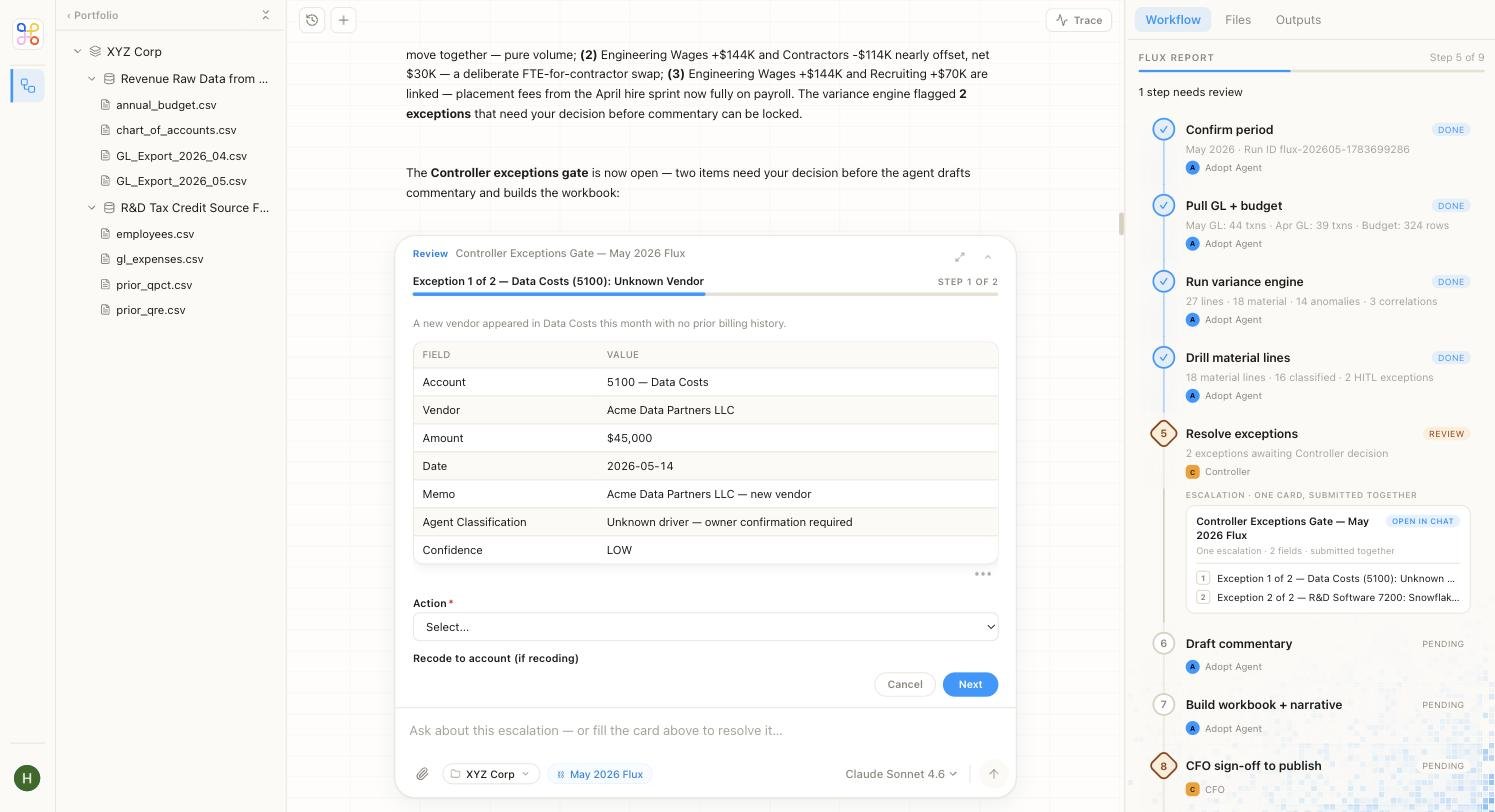
A worked example: a flux review
Say the Revenue Flux Reports agent has run for a client. The Workflow panel shows the steps it completed — Confirm period → Pull GL + budget → Run variance engine → Drill material lines — all marked Done, with Resolve exceptions marked Review and Draft commentary, Build workbook, and CFO sign-off still Pending. The run has stopped at a gate and is waiting on you. The agent explains what it found in plain language, then opens a Controller exceptions gate with an “Action needed” card. For example, Exception 1 of 2 — Data Costs (5100): Unknown Vendor:
You pick an action (confirm the classification, recode it, or send it back), and only once you’ve cleared the exceptions does the agent move on to draft the commentary and build the workbook. Nothing downstream happens until you decide.
Your two decisions
- Approve — the work is correct. It becomes final and can be shared or promoted. Your approval is recorded with your name and the time.
- Send back — something’s off. Add notes describing what needs to change, and the work returns for correction. Nothing is shared until it comes back and you approve it.
Why your approval matters
Every approval is recorded — who approved, and when — as part of an auditable trail. That record is exactly what lets Adopt be used for regulated finance work: there’s always a named person standing behind each final output. See Human-in-the-loop review for how the gate works underneath.Tips
Next steps
- Human-in-the-loop review — the concept behind the gate
- Notifications — get pinged the moment something needs you
- Your dashboard — the wider view of your work